
‘It’s Been Going On For Hours’: Tesla Driver Says His Touchscreen Won’t Respond. It’s Not Just Him
'So frustrating.'
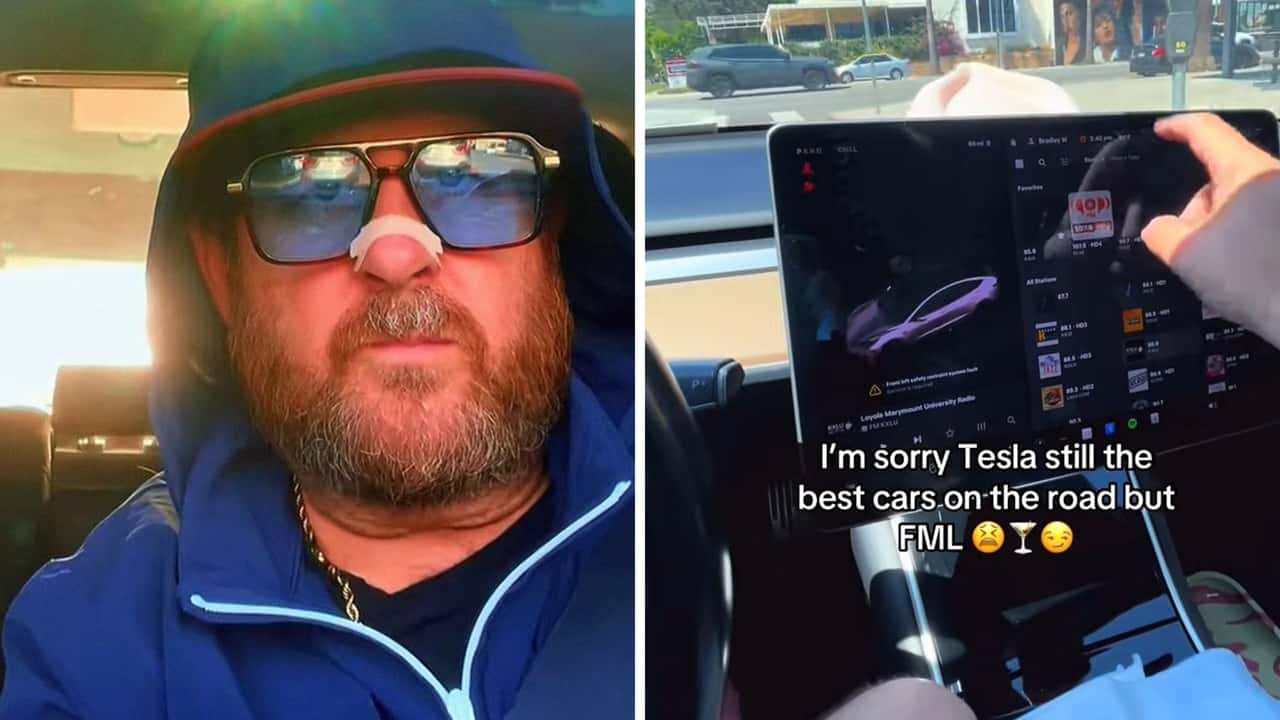

A Tesla owner just wanted directions to Dantanas, a Hollywood restaurant. Instead, his Model 3’s touchscreen served up a comedy of errors—mis-typed letters, screen jumps, and a stubborn refusal to cooperate—all caught in a TikTok that’s struck a chord with EV fans. The culprit, he says, is the same thing that’s been plaguing him for over a year: Cleaning the screen.
The post from cannily named creator FatRyanGosling (@fatryangosling) captures the driver ping-ponging between expressing his fandom for Tesla vehicles while also being at his wit’s end because of the recurring screen glitches.
“It's been going on for hours today, dude. It's just, it's so frustrating,” he laments while trying to navigate to his desired eatery.
Tesla Screen Cleaning Causes Chaos
The driver’s infuriating experience of attempting to type a destination and getting a sluggish, glitchy ordeal is far from unique. Owners frequently report that after cleaning their Tesla’s touchscreen, the interface either freezes, misreads input, or responds with “ghost touches.” One Tesla driver described how their screen “randomly stops working unless I park to the side and reset the whole thing.”
Behind the scenes, this behavior is typically caused by moisture, residue, or static charge, all of which can interfere with the glass’s capacitive touch sensors. These sensors register touch by detecting the electrical charge differences your finger creates. Experts advise that unwanted conductive materials like cleaning sprays or damp cloths can confuse the system, leading to unresponsiveness or erratic behavior.
Tesla's manuals emphasize care when cleaning, specifically warning against many common agents. Users are told to clean their front touchscreen with only a soft lint-free cloth, and never a wet wipe, glass cleaner, or anything that may generate static.
They also advise using Screen Clean Mode, which disables touch input and dims the display so you can safely wipe smudges without accidentally triggering buttons or settings. Exiting this mode requires holding a prompt until the touchscreen returns to normal—though users note this, too, can sometimes leave residual smudges or require a reboot.
Notably, if the screen remains unresponsive after cleaning and waiting, Tesla's troubleshooting steps recommend a scroll-wheel reset—holding both steering-wheel scroll buttons to reboot the touchscreen—and, failing that, a full power cycle of the car
FROM THE TRENDING NEWS DESK
Viral bits from across the social media landscape
Our team of experts tracks what's trending so you don't have to—from viral videos to online debates that have everyone talking.
UI Design, Redundancy, and Daily Usability
Tesla’s approach to interior design is famously minimalist. In most of its models, the large central touchscreen is the nerve center for almost every aspect of the car’s operation. Climate controls, mirror adjustments, seat heating, driving mode changes, even glovebox access are all routed through that single interface.
The upside is a sleek, uncluttered cabin and the ability to deliver over-the-air updates that can radically change the car’s capabilities overnight. The downside is that when the touchscreen falters, whether because of a software hiccup, hardware fault, or something as innocuous as post-cleaning sensitivity, it can disrupt multiple systems at once. A glitch in your music app is one thing; a glitch in the same panel that controls defogging on a rainy night is another.
Now Trending
Other automakers have been slower to embrace such total screen dependency, and for good reason. Brands like Hyundai, Kia, Ford, and Volkswagen still retain some physical redundancy for key functions like volume, temperature, and hazard lights. This approach offers a safety net so if a screen freezes, you can still turn down blasting audio or adjust the cabin temperature without digging through menus.
The Tesla TikTok clip doesn’t just highlight a frustrating quirk after cleaning; it invites a broader question about the trade-offs of software-centric vehicle control. In the world of consumer electronics, a frozen phone screen is an inconvenience. In a vehicle, a frozen screen, especially one that consolidates essential functions, can become a real usability and even safety concern.
For EV shoppers, the story becomes less about “a glitchy screen” and more about design philosophy: Is the elegance and updateability of a single, central control worth accepting the risk that a minor fault could temporarily take out half the car’s functions?
What If Your Tesla’s Screen Goes Out Completely?
If a Tesla's main touchscreen fails, whether due to a glitch, reboot, or cleaning mishap, you don’t lose control of the vehicle. According to Tesla owners, you can still drive the car normally, and key functions like turn signals, headlights, and Autopilot continue to work as usual, even during the reset process.
Hazard lights, wherever the switch may be (often located overhead), should remain accessible as long as the 12‑volt battery is functional, ensuring you can still signal emergencies. This redundancy means that, while the touchscreen is down, you aren't left stranded since critical braking, steering, and emergency functions remain operational.
Tesla’s touchscreen-first design is strategic as well as aesthetic. Physical buttons add substantial engineering and manufacturing complexity since each button needs precise design, sourcing, integration, and early validation in the design process. In contrast, a large touchscreen simplifies these dependencies, allowing the hardware and software teams to operate more independently up to final production or via over-the-air updates.
That said, the industry is pushing back. Reports note a growing shift toward hybrid interiors, where essential controls like temperature, headlights, or volume are given physical buttons for safety and usability, while more complex tasks stay on screens. Automakers like Volkswagen are even reintroducing physical knobs in models like the ID.2all, responding to consumer feedback for tactile control.
Inside EVs reached out to the creator via direct message.

RECOMMENDED FOR YOU

An App Flagged This Tesla Battery As Degraded. The Car Said It Was Worse
How America’s Policy Whiplash Derailed The EV Transition
This Ex-Rental Tesla's Battery Was Heavily Degraded. Then The Decline Slowed
The Hyundai Ioniq 5 Is Now America's Best-Selling EV That Isn't A Tesla
This Tesla Model 3 Went Nearly 400 Miles In A Range Test, 30 More Than Its EPA Rating
Polestar EVs Are A Whopping $25,000 Off After The Brand Got Kicked Out Of America
The Best EV Lease And Finance Deals In June 2026